![RichardsonLogo-3.png]](https://ithelpdesk.richardsoncap.com/hs-fs/hubfs/RichardsonLogo-3.png?height=39&name=RichardsonLogo-3.png)
1. Identifying Items with Barcode Issues
To determine which items have multiple or missing barcodes:
- Open the following file on SSMS:
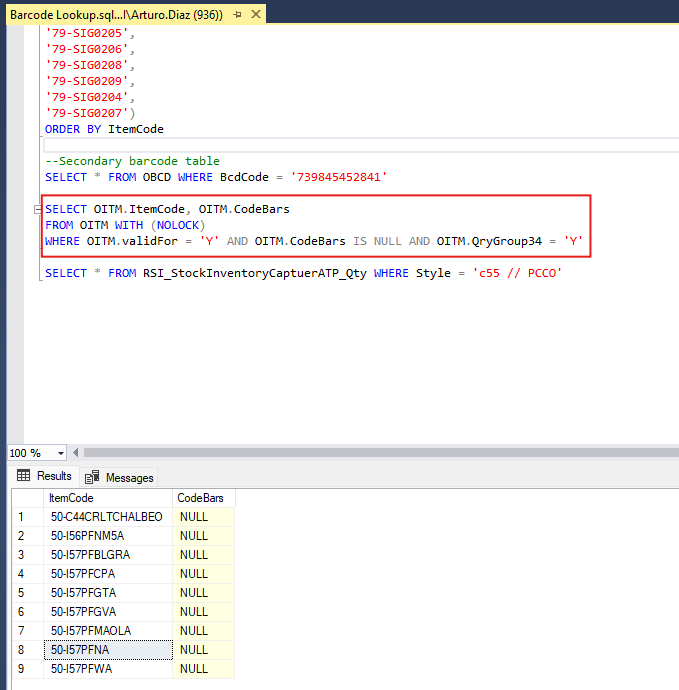
\Richardson Sports\IT Internal - Documents\SAP\Queries\Barcode Lookup - Run the Barcode Lookup query (With last condition OITM.QryGroup34 = "Y").
- Review the item codes to check for missing or duplicate barcodes.
- The last AND condition in the query can be used to filter for only currently stocked items.
- These need to be addressed immediately.
2. Fixing Barcode Issues in SAP Business One
Once you have identified an item number that needs fixing:
- Open SAP Business One.
- Navigate to Inventory → Item Master Data.
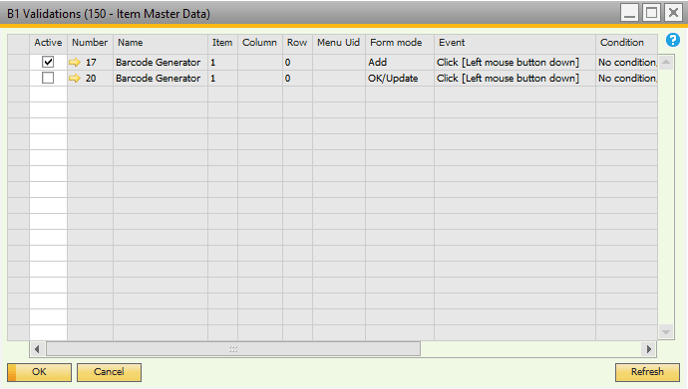
- Open B1 Validation (Ensure you are an authorized user with OK/Update permissions).
- Modify Barcode Settings:
- Right-click the Barcode text box.
- Select B1 Usability Package → Edit B1 Validation Configurations.
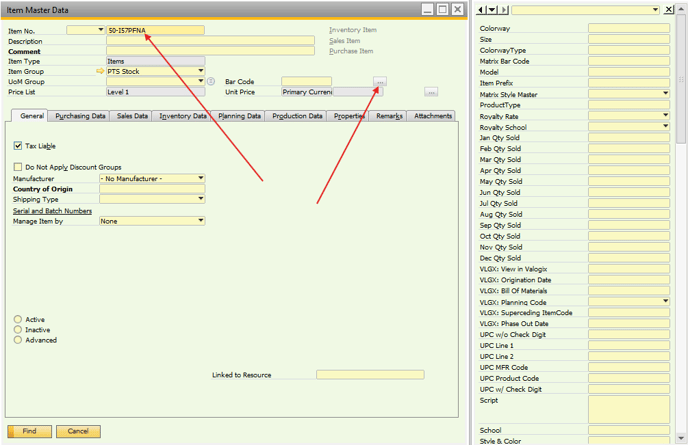
- Search for the specific Item Number.
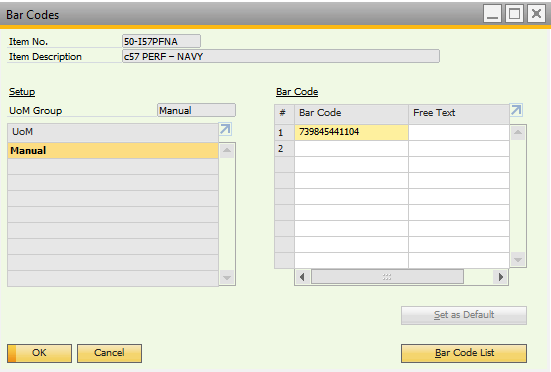
- Open the Bar Codes window (using the button on the right).
- Delete all existing barcode rows:
- Right-click all rows and select Delete Row.
- Click Update → OK on barcodes window NOT ITEM MASTER WINDOW.
3. Finalizing the Fix in B1 Validations
- Go to the B1 Validations tab (opened earlier).
- Activate the OK/Update tool.
- Click Update.
- DO NOT UPDATE TWICE – Doing so will create duplicate barcodes.
- Deactivate the OK/Update tool in the B1 Validations tab.
- Perform a final update in the Item Master Data tab.
- Search for the next Item Number that requires fixing and repeat the process.
Final Notes
- Always ensure that only one barcode exists per item to prevent future processing issues.
- If you mistakenly update twice, repeat the process to remove duplicates.
- Items that are currently stocked should be prioritized.
By following these steps, you can eliminate barcode errors in SAP Business One, ensuring data accuracy and inventory integrity.